1. Choose the Oval Width and Height
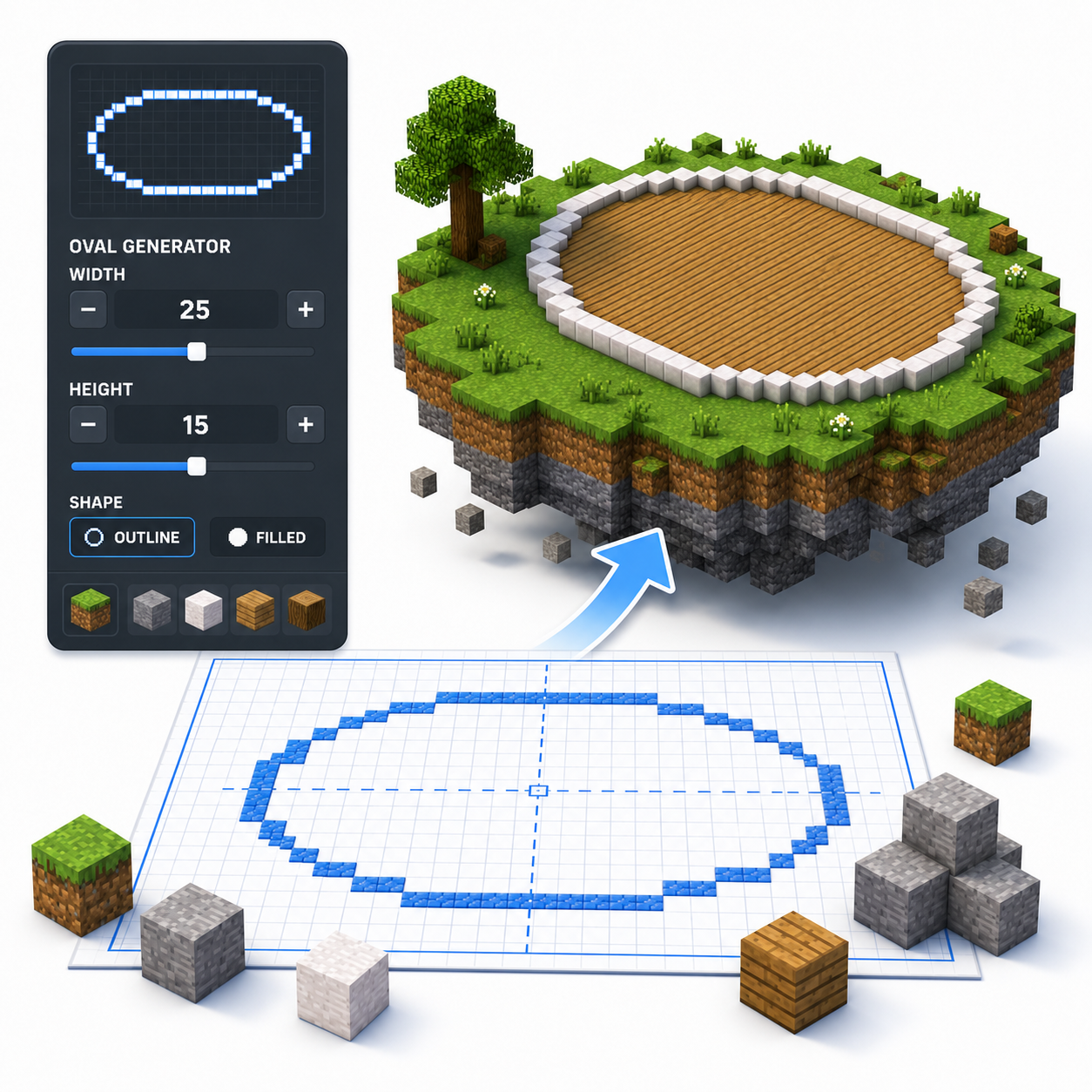
Enter or adjust the horizontal width and vertical height of your oval. Use different values to create anything from a slightly stretched circle to a long elliptical layout.
Free pixel oval blueprint tool
Enter the width and height to generate a pixel-perfect oval block layout for your Minecraft build.
 Loved by 6.5M+ Minecraft users
Live block grid
How it works
Enter or adjust the horizontal width and vertical height of your oval. Use different values to create anything from a slightly stretched circle to a long elliptical layout.
Choose Outline mode for walls, tracks, pools, and building footprints. Choose Filled mode when you need a complete floor, platform, garden, or decorative area.
Review the generated block-by-block grid. Check the longest horizontal and vertical sections to make sure the proportions fit your available building space.
Change the width or height until the oval matches your project. A wider oval works well for arenas and pools, while a taller oval can be useful for windows, portals, and decorative facades.
Download the generated pattern as a PNG reference. Start from the center lines, complete one quarter of the oval, and mirror the pattern to keep both sides symmetrical.
Tool features
Create stretched Minecraft layouts with separate width and height controls, multiple fill styles, live block previews, and downloadable blueprint files.
Set horizontal and vertical dimensions separately to create compact ovals, stretched arenas, long pools, or tall decorative openings.
Use an outline for walls and paths, a thicker ring for stronger borders, or a filled layout for floors, gardens, and platforms.
See every block position before building. Center lines and grid lines make it easier to align the oval inside your Minecraft project.
Check the required block count, then download a PNG reference or .schem file for compatible Java Edition editing workflows.
FAQ
A Minecraft oval generator converts a chosen width and height into a block-by-block oval pattern. It helps you build elliptical floors, walls, arenas, pools, paths, and decorative structures without manually calculating each row.
A circle uses the same width and height, while an oval uses different horizontal and vertical dimensions. Increasing the width creates a flatter oval, while increasing the height creates a taller, narrower shape.
Yes. The Minecraft Oval Generator allows you to set the horizontal width and vertical height independently, giving you precise control over the final proportions.
Odd dimensions create a single center row or block, which often makes alignment easier. Even dimensions create a center line between two rows or columns. Both work, but the best choice depends on how the oval connects to the rest of your build.
Yes. Outline mode generates only the outer edge, while Filled mode includes every block inside the oval.
Ovals work well for stadiums, racetracks, ponds, gardens, airship bodies, large windows, halls, plazas, and elongated tower foundations.
Mark the horizontal and vertical center lines first. Build one quarter of the pattern, then mirror it across both center lines. Check the row lengths regularly before continuing.
Yes. You can download the generated oval pattern as a PNG image and keep it open while building in Minecraft.
Testimonials
See how Minecraft builders, streamers, survival players, and new creators use the generator to plan accurate circles, ovals, spheres, and domes faster.
The Minecraft Circle Generator is an absolute game-changer! I was struggling to create perfect circles for my builds, but this tool made it so easy. Just input the diameter and it gave me a clear blueprint to follow. The filled and outline options are perfect for different types of projects. Highly recommend it!
★★★★★I love using the Circle Generator for my Minecraft creations! It simplifies the process of building ovals and spheres, making my designs look way better. The PNG download feature is fantastic, allowing me to keep the blueprint handy while I build. This tool has really improved my gameplay!
★★★★★As a Minecraft architect, precision is key. The Circle Generator has been a lifesaver, providing pixel-perfect blueprints for all my circular designs. I particularly appreciate the layered sphere feature, which gives a clear view of each level. It is easy to use, and I cannot imagine building without it!
★★★★★I started using the Minecraft Circle Generator for my streams, and my viewers love it! It takes the guesswork out of building circles and domes, which makes for smoother gameplay. The ability to switch between outline and filled modes is a major plus. This is a must-have tool for any Minecraft enthusiast!
★★★★★This tool is simply amazing! I often struggle with making round shapes in Minecraft, but the Circle Generator provides precise blueprints that I can easily follow. The common sizes guide helped me decide on the best diameter for my builds. It has saved me so much time and frustration!
★★★★★
As a new player, I found the Minecraft Circle Generator incredibly helpful. The step-by-step guide made it easy to understand how to build circles and domes. I love that I can create blueprints for different shapes and sizes, and the tool is super user-friendly. Definitely a great resource!
★★★★★